Software Tools Buying Guide
Build your essential tech stack with the right tools in the right order
Selection Priority Order
1
Communication System
Essential Foundation
Your team’s central hub for real-time collaboration, file sharing, and reducing email overload. This is your first critical investment.
2
Project Management
Core Operations
Centralize task tracking, workflows, and team accountability. Essential for scaling beyond 3-5 people.
3
AI Assistant
Productivity Multiplier
Accelerate content creation, research, coding, and problem-solving. Choose based on your specific use cases.
4
Specialized Tools
Problem-Specific
Only add when addressing specific problems. Examples include: CRM for sales teams, design tools for creative work, analytics platforms for data teams. Each tool must solve a clear, documented pain point.
Avoid Tool Bloat
If a tool doesn’t justify its cost through measurable efficiency gains, remove it from your stack. Every additional tool adds complexity, training overhead, and integration challenges. Less is more when each tool earns its place.
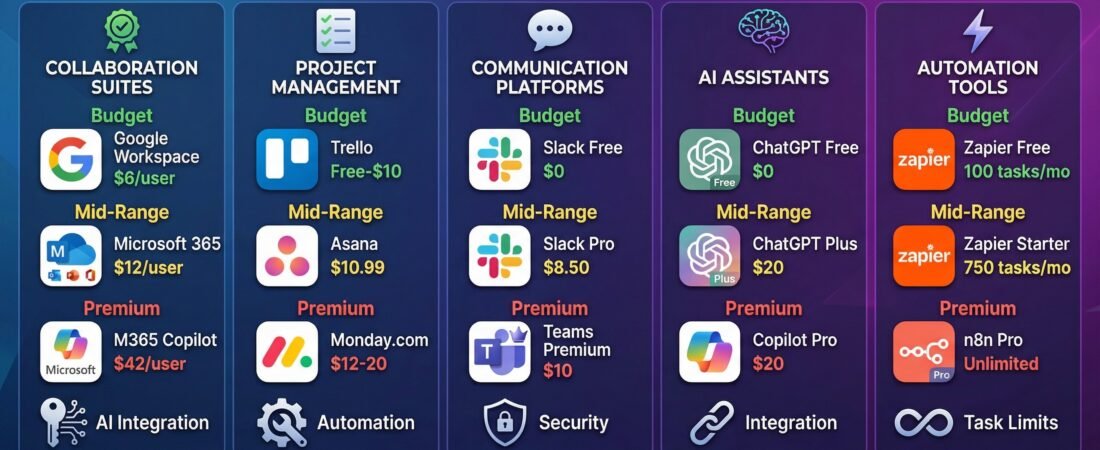
Find the best digital tools for every budget. Compare platforms across productivity, automation, and collaboration to build an efficient, scalable tech stack.
For the detailed article, check out Best Digital Tools Options for Every Budget