
Your monthly software bills keep climbing. Last month you paid for Slack, Asana, an AI writing tool you barely touched, and three other subscriptions you forgot about until the charge appeared.
You added them one at a time because each one seemed necessary. Now you’re paying $400+ monthly for digital tools that don’t even connect to each other.
I’ve been there. After years of testing productivity software and building teams, I learned the expensive way that buying based on hype creates tech-stack chaos. You end up with powerful tools that sit in isolation, forcing your team to manually copy data between platforms. Let’s go through this guide together :
Software Tools Buying Guide
Build your essential tech stack with the right tools in the right order
And the subscription cost isn’t the biggest problem.
The hidden expense is the time your team wastes trying to make incompatible tools work together.
Manual data entry. Constant context switching. Learning curves that never end.
This guide breaks down which digital tools actually deliver value at different budget levels. You’ll see what to buy when you’re bootstrapped, what to add as you grow, and which premium platforms justify their price tag.
Key Features to Consider
1. Integration Capability
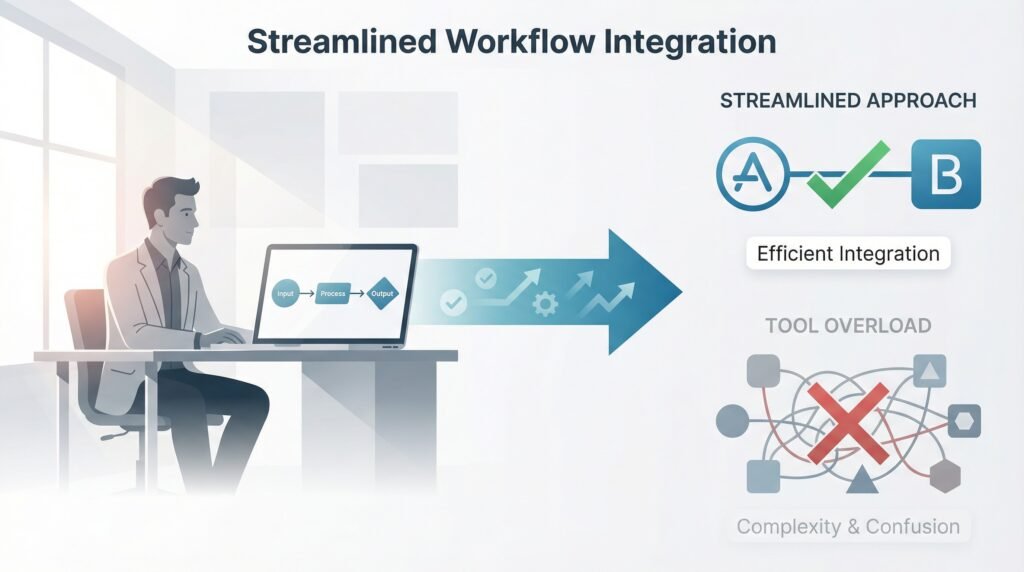
Integration separates useful tools from expensive headaches. Your software must talk to your other software.
For example, Google Workspace integrates smoothly with hundreds of third-party apps (Official documentation source: Google Workspace Help).
On the other hand, specialized standalone tools may require connectors like Zapier—or custom API development.
Before investing in any tool, check the integration list. If it doesn’t connect with your core stack, it will create work instead of eliminating it.
2. Ease of Implementation
A tool is only valuable if your team actually uses it.
I’ve watched companies spend thousands on sophisticated platforms that nobody touches after onboarding. The software had incredible features, but learning it felt like a part-time job.
Trello gets adopted because you can learn it in 10 minutes. Monday.com offers more power but requires more training. Match complexity to your team’s technical comfort level.
3. Scalability
Some tools work beautifully for 5 people but break down at 50. Others scale smoothly from solo founder to enterprise team.
Slack, Asana, and Google Workspace grow with you. Smaller tools often hit feature ceilings that force you to migrate later.
And migration is expensive—it steals weeks of productivity.
4. Automation
True automation removes work. It doesn’t just organize it. Basic project-management tools track tasks. Automation tools eliminate tasks entirely.
Platforms like Zapier (Automation documentation available via Zapier Learn Hub) can turn a single form submission into:
- A new CRM contact
- A triggered email
- A task assigned in Asana
- A Slack notification
What took 10 minutes of manual work now happens instantly. Look for tools that remove steps from your workflow—not just rearrange them.
Top Recommendations
Budget Tier: Free to $50 Monthly
Google Workspace ($6–18/user monthly)
This is the foundation most lean teams need.
Gmail for communication.
Docs, Sheets, and Slides for instant collaboration.
Drive for cloud storage with powerful search.
Meet for video.
Paid plans unlock real-time collaboration and professional domain hosting.
Start your Google Workspace free trial here.
Notion ($0–10/user monthly)
Notion becomes your team’s shared brain.
The free plan gives you notes, wikis, databases, and project tracking.
With the $10 plan, Notion AI summarizes pages, generates content, and answers workspace questions.
Notion works best when you commit to storing everything in one place. Scattered information defeats the purpose.
ChatGPT Free or Gemini Free
Both options cover AI assistance at no cost.
ChatGPT helps with writing, coding, and research.
Gemini integrates directly into Google Workspace to summarize documents, draft emails, and find information.
Both tools scale to paid versions when your usage increases.
At this tier, you’re building a strong foundation that won’t need replacing as your business grows.
Growth Phase: $50–200 Monthly
Slack ($8.50–15/user monthly)
Slack replaces email chaos once your team reaches eight or more people.
Channels organize conversations.
Search finds every message.
Bot integrations pull information from your other tools.
Slack centralizes institutional knowledge so nothing gets lost.
Asana ($10.99–24.99/user monthly)
Asana eliminates spreadsheet-based project management.
Tasks can exist across multiple projects.
Timeline view shows interdependencies.
Asana AI suggests priorities and flags risks early.
Automations assign next steps, update timelines, and notify teams without meetings.
Synthesia ($29 monthly)
Type your script, choose an AI presenter, and Synthesia generates a polished video.
It’s ideal for tutorial videos, onboarding, and brand explainers.
What used to take hours now takes minutes.
Fathom ($19 monthly)
Fathom records, transcribes, and summarizes every meeting.
You get action items, key decisions, and searchable notes—without taking manual notes.
Once you try it, it’s hard to go back.
Professional Setup: $200–500 Monthly
Microsoft 365 + Copilot ($30 add-on)
Copilot embeds AI directly into Word, Excel, PowerPoint, and Teams. It writes drafts, creates presentations, analyzes spreadsheets, and summarizes meetings—inside the apps your team already uses.
Zapier Premium ($30–99 monthly)
When your stack gets complex, Zapier becomes the backbone.
It automates every repetitive task:
- CRM updates
- Lead capture
- Email triggers
- Task routing
This is where real operational leverage begins.
Cursor ($20 monthly)
Cursor accelerates software development by integrating AI into VS Code-style workflows. It understands your full project and assists with code generation, debugging, and optimization.
Hootsuite ($16.58–24 monthly)
Hootsuite manages social media across multiple platforms in one dashboard.
Schedule content.
Analyze performance.
Coordinate team workflows.
Comparison and Analysis
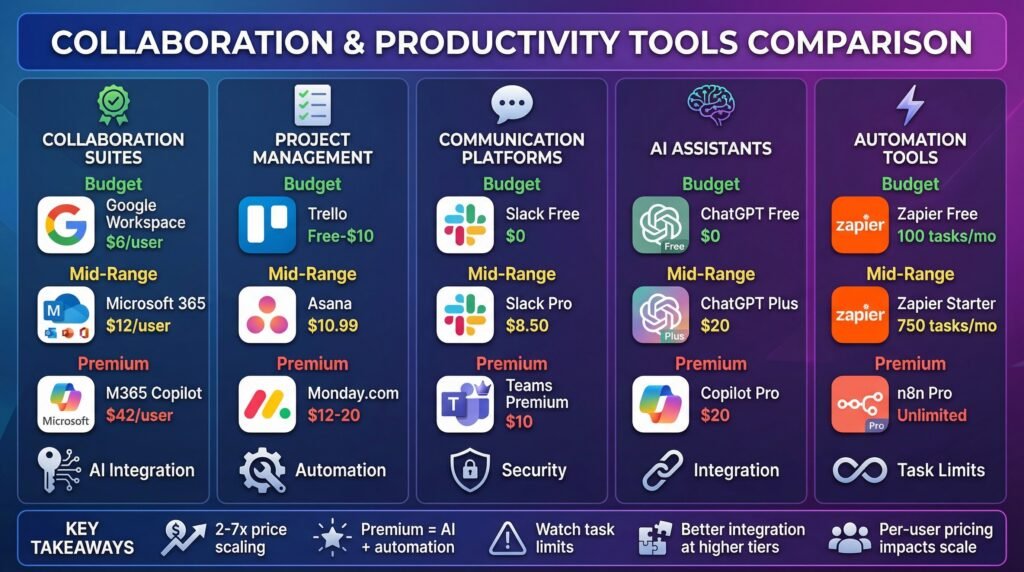
| Tool Category | Budget Option | Mid-Range Option | Premium Option | Key Differentiator |
| Collaboration Suite | Google Workspace ($6/user) | Microsoft 365 ($12/user) | Microsoft 365 + Copilot ($42/user) | AI integration depth |
| Project Management | Trello (Free–$10/user) | Asana ($10.99/user) | Monday.com ($12–20/user) | Automation capabilities |
| Communication | Slack Free | Slack Pro ($8.50/user) | Microsoft Teams Premium ($10/user) | Enterprise features |
| AI Assistant | ChatGPT Free | ChatGPT Plus ($20) | Copilot Pro ($20) + ChatGPT Plus | Workflow integration |
| Automation | Zapier Free | Zapier Starter ($30) | n8n Pro ($29/user) | Task volume limits |
Buying Guide
Pick tools in this order:
- Communication system: Slack or Microsoft Teams
- Project management: Asana or Monday.com
- AI assistant: ChatGPT or Gemini or Copilot
- Specialized tools: Only when they solve a specific problem
Always test before committing long-term. Efficiency must exceed subscription cost—otherwise, the tool doesn’t belong in your stack.
Software multiplies your existing processes.
Good systems get better.
Broken systems break faster.
Final Thoughts
You don’t need every tool that launches on Product Hunt.
You need the smallest set of digital tools that eliminates friction in your actual workflow.
Start minimal.
Scale intentionally.
Choose tools that integrate, automate, and support your long-term growth.
Software should reduce friction—not reorganize it.